
This comprehensive guide will walk you through the installation, setup, and customization of your VoidcoreAI template, helping you build a sleek, professional, and engaging website for your AI or tech-focused business.
VoidcoreAI Pro Theme Documentation
Introduction
Customizing Your Website
Global Settings
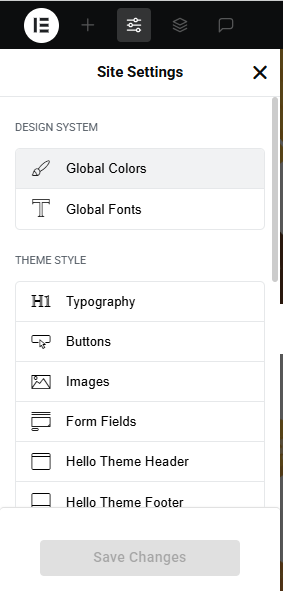
- Go to Elementor > Site Settings.
- Adjust typography, colors, and layout settings.
Header & Footer Setup
- Use Elementor Theme Builder to edit the header and footer.
- Customize the navigation menu, logo, and contact details.
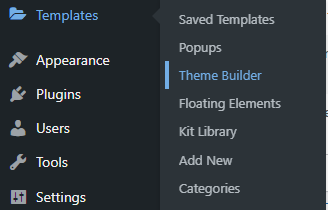
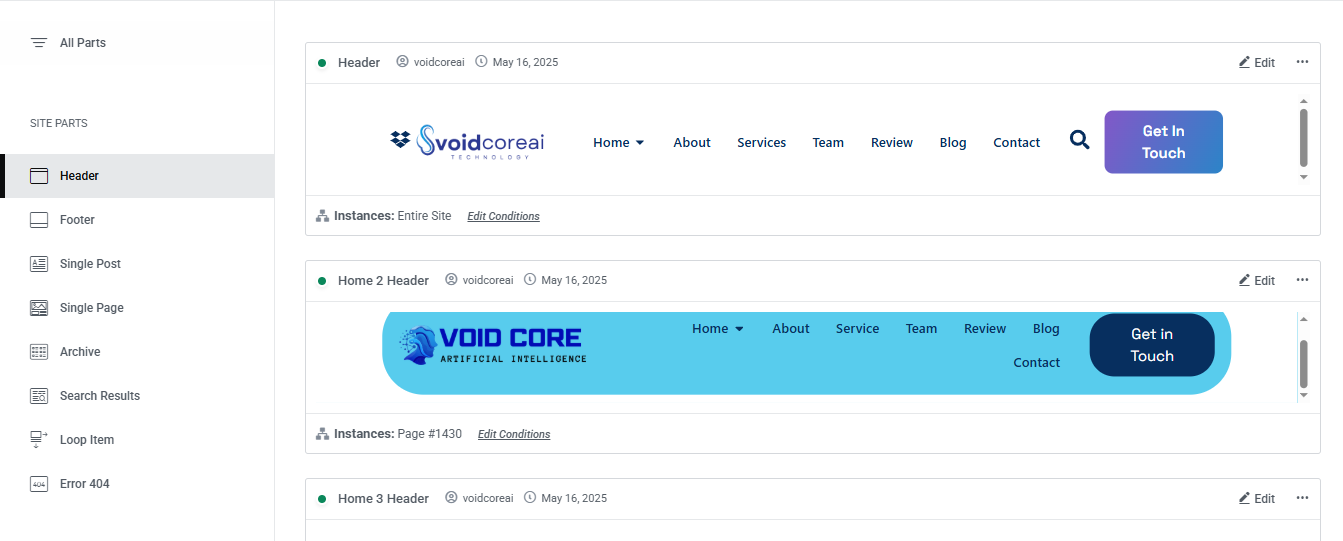
You can drag and drop the elementor widget’s menu first. If you’d like, you can add items or simply drag each one, after which you can add a icon list from the widget and create my account and login page than apply a custom style from the style option.

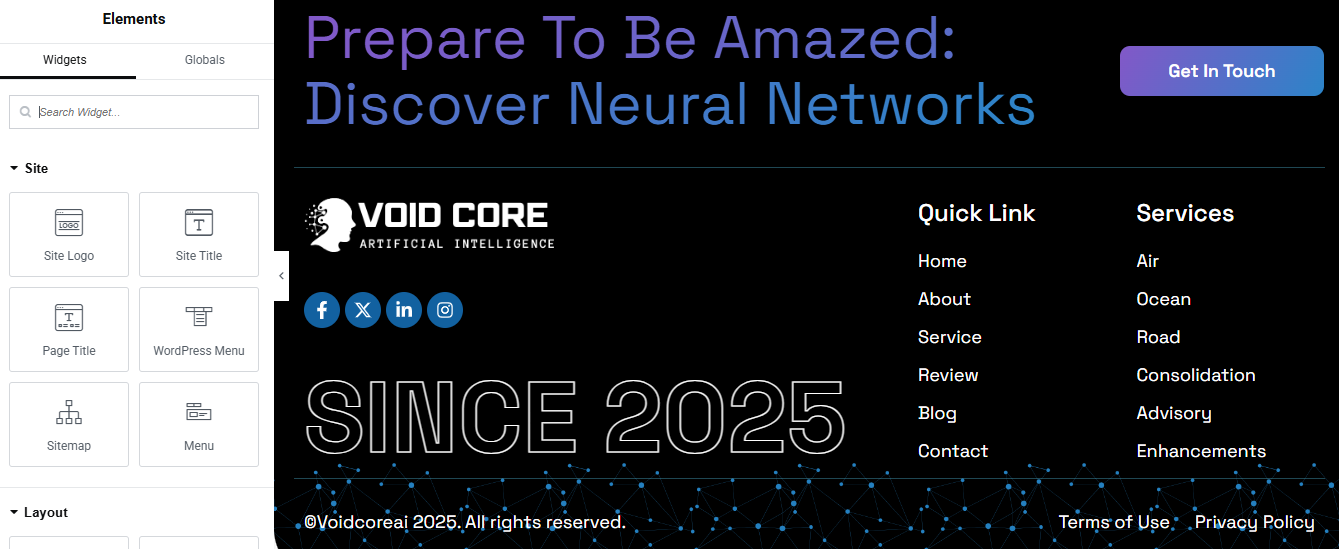
you can add newslatter form, timing, contact details, logo, menu and if you wish in footer, and create you best design.
Home Page Setup
Using Pre-Built Layouts
Navigate to Setting >> Reading
Choose the Static Page option.
Choose an existing homepage or create a new one.
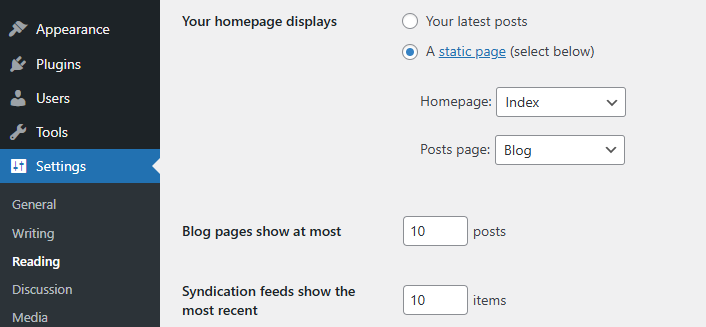
Add The Section in home page using elementor
Add components such as these using the Drag & Drop Builder:
- Hero Section
- Technology
- About Section
- Our Services
- CTA Section
- Why Choose Us
- How It Work
- Review Section
- Achievements Section
- Team Section
- Contact Section
- FAQ Section
- Blog Section
Main Hero Section

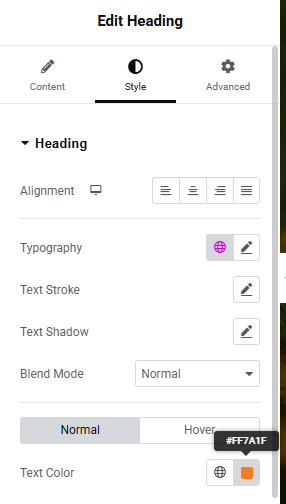
Insert the Carousel or Slider Widget
- In the Elementor widget panel, search for “Carousel,” “Slides,” or “Slider” depending on your plugin.
- Drag and drop the Slides or Hero Slider widget into the section.
Configure the Slides
- Carousel Name – Rename it for internal clarity (e.g., HeroSlider).
- Carousel Items – Add your slides:
- Click Add Item to create a new slide.
- Enter a Title and Description (like “Unlocking the Future of Business with Smart AI Technologies”).
- Add a Background Image or Gradient (like your blue background).
- Add a Button with a link and label (e.g., Discover More →).
Style the Slides
- Customize the Typography, Colors, Padding, and Alignment in the Style tab.
- Adjust Text Color to contrast with your background.
- Set the Background Overlay if needed for better readability.
Navigation & Behavior
- Enable or disable Arrows / Dots for navigation.
- Set Slides to Show = 1 and Slides to Scroll = 1 (as shown in your image).
- Enable Autoplay, Loop, or Fade Effect as desired under the Advanced / Settings tabs.
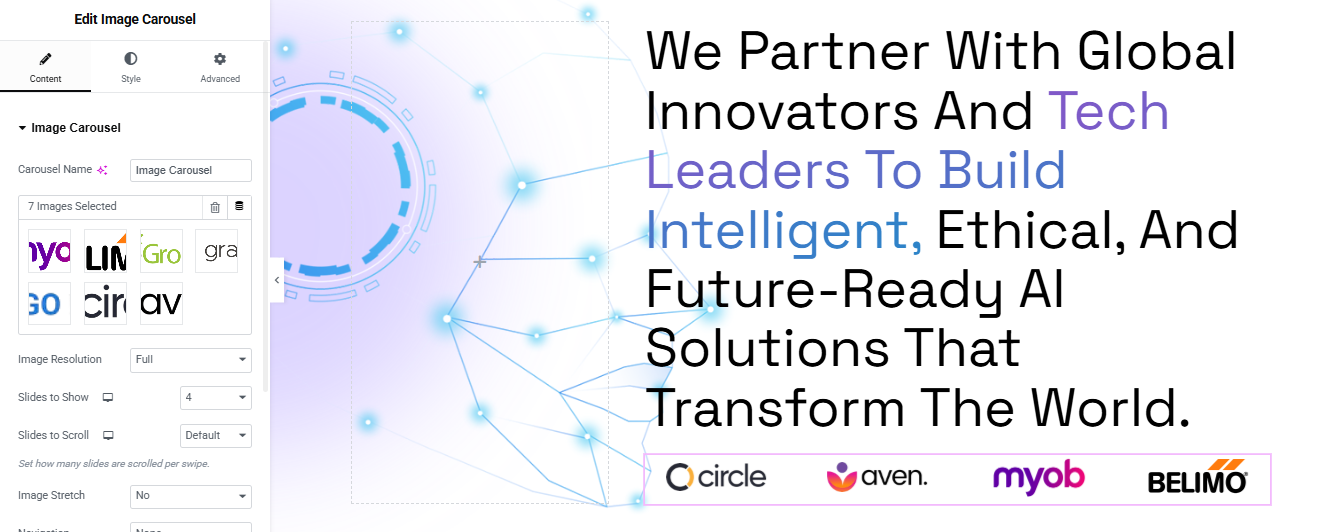
- Here we add another title for describe to ai technology in brief
- image carousel
here add logo slider its desplay our client logo you can add any logo add for display
Add Logo Slider (Image Carousel)
- Drag the Image Carousel widget below your text content.
- Upload logos (e.g., circle, aven, myob).
- Set:
Slides to Show: 3–5 (based on logo count). - Navigation: Dots or Arrows.
- Autoplay: Yes (optional).
- Image Size: Medium or Thumbnail.
About Us Section
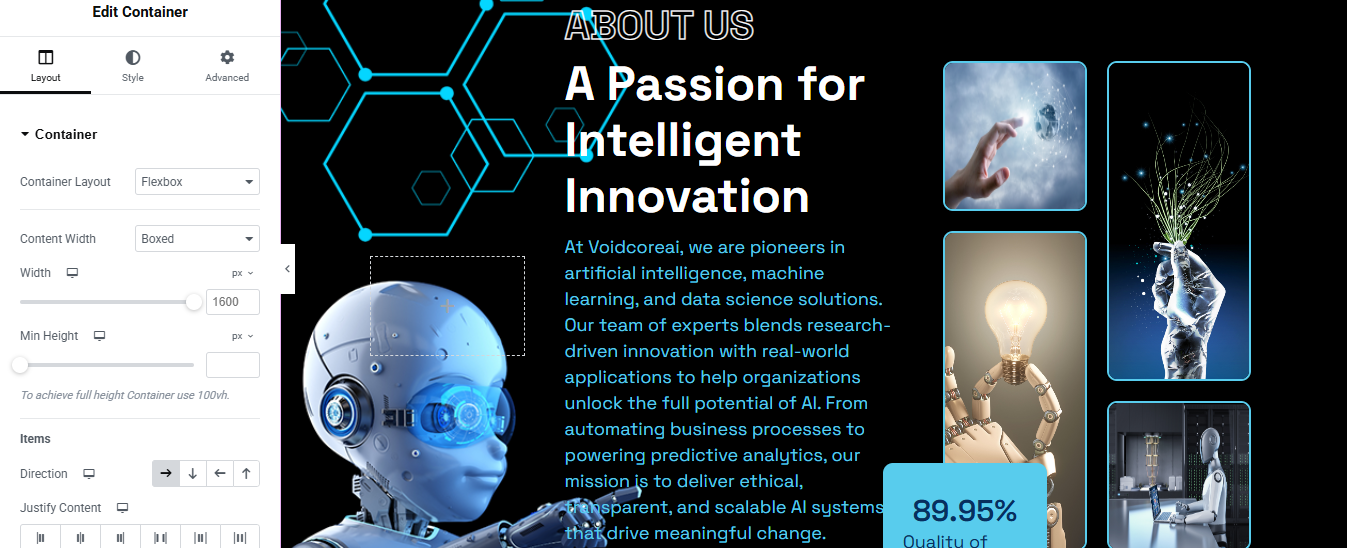
Add Two Inner Containers (Split Layout)
- Add two inner containers side by side:
- right Container (for image or decorative background)
- left Container (for text content and logos)
Design the Left Container (Decorative Image or Background)
- Click on the left container.
- Go to Style > Background:
- Choose Background Type: Classic or Gradient.
- Upload an AI-themed image, tech background, or SVG.
- You can also add motion effects from Advanced > Motion Effects.
Add Content to the Right Container
- Badge/Button:
- Add a Button widget or Text widget with “About Us”.
- Heading:
- Add a Heading widget with large, bold text
- Text Editor:
- Add a Text Editor widget below with supporting text.
- Button:
- Add a Button labeled “Read More →”.
- Spacing: Add padding/margins where needed.
- Typography: Adjust font size, weight, and color.
- Container Background: Add a slight gradient or background pattern.
Services Section

Add a Container
- Drag a Container onto the page.
- Set the Container Layout to Flexbox.
- In the Layout settings:
- Direction: Vertical (default).
- Width: Adjust or keep responsive.
- Align Items: Center or Stretch depending on the design.
- Justify Content: Start.
Add Image or Decorative Element
- Drag an Image widget to the top of the container.
- Upload the tech-style image or abstract 3D render.
- Set Image Size to Medium or Full.
Add Heading and Text
- Add a Heading Widget:
- Text:
- Style: Bold, large font size, white or light text color.
- Align: Center or Left (based on layout).
Add a Text Editor Widget:
- Description:
- Style it with lighter font weight and slightly smaller size.
Final Touches
- Padding: Add 20–40px padding inside the container.
- Border Radius: Optional—add 20px for rounded edges (Style > Border).
- Box Shadow: Add subtle shadow if you want depth.
CTA Section
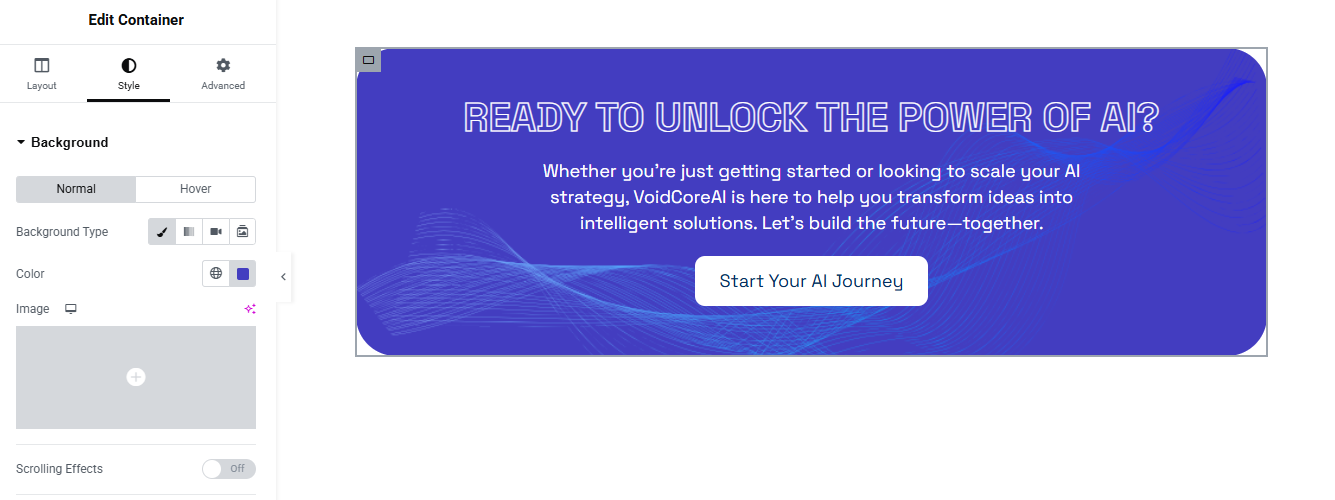
Setup:
- Full-width container with center-aligned text and button.
Widgets:
- Heading: “Ready to Transform with AI?”
- Button: “Get Started Now”
Styling:
- Background: Gradient or Purple
- Text: White
- Button: White background, Purple text
Why Choose Us

Add Heading & Label
- Above the Grid Container, add a new Container.
- Inside it:
- Add a Text widget or Button for the label “Feature” with black background and white text.
- Style: Padding, border-radius, small font.
- Add a Heading widget for:
- Use a modern, bold font and set color to dark navy.
- Use responsive typography (e.g., 40–50px on desktop, smaller on mobile).
- Add a Text widget or Button for the label “Feature” with black background and white text.
Add Two Inner Containers (Split Layout)
- Add two inner containers side by side:
- right Container (for title, subtitle or CTA section)
- left Container (for text content and logos)
How It Work Section
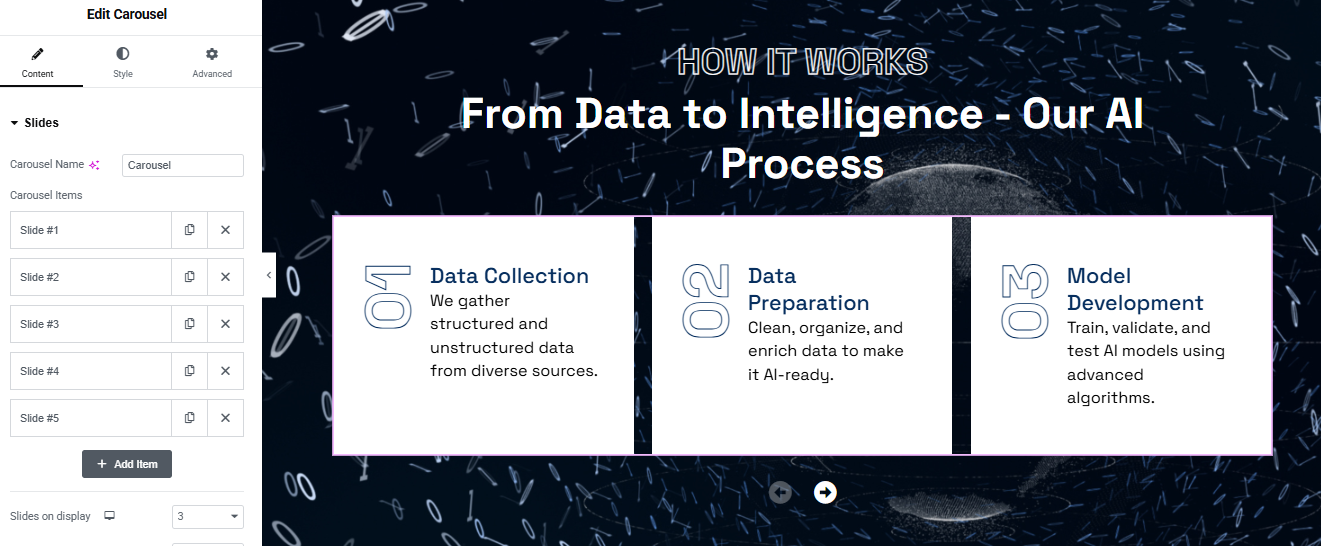
Add the Heading
- Drag a “Heading” widget into the section.
- Top heading:
- Main heading:
- Style:
- Align Center.
Add the Carousel Widget
- Drag the “Slides” (Carousel) widget (from Elementor Pro or a carousel
- Carousel Name: e.g., Carousel
- Slides on Display: 3
Step 4: Edit Each Slide
- Repeat for each item:
- Click on Slide #1, and edit:
- Title:
- Content:
- Do the same for:
- Slide #2:
- Slide #3:
Add Slide #4 and #5 if needed.
Style the Carousel
- Box:
- Background: White
- Border: Subtle border with a hover effect
- Padding: Add spacing inside the box (e.g., 20px)
- Typography:
- Headings: Bold, Blue (as in the image)
- Numbers: Large, outlined or low-opacity gray style
- Navigation Arrows:
- Position them at the bottom center
- Choose an icon style (arrow, chevron)
- Make sure they’re visible against your background
Testimonial Section

Left Column – Testimonial Card
- Drag in a Testimonial Carousel or carousel widget
- OR manually create using Image + Icon + Text + Navigation buttons
- Background Image (similar to the tech-style blueprint image)
- Inside that, add a box with padding and background color (dark blue).
- Add:
- Quote icon (Icon widget)
- Testimonial text:
- Image (circle):
- Name + Title:
- Style:
- Rounded corners (e.g., 20px)
- Typography: Light text on dark background
- Icon color: Light blue
Right Column – Heading and Counters
- Small Heading:
- Main Heading:
- Below, add two Icon Boxes / Counters:
- Box 1:
- Box 2:
Style Each Box:
- Dark background (e.g., #002c60)
- White or light text
- Rounded corners (20px)
- Padding: ~20px inside each box
- Space between the boxes (margin or padding)
Achievement Section
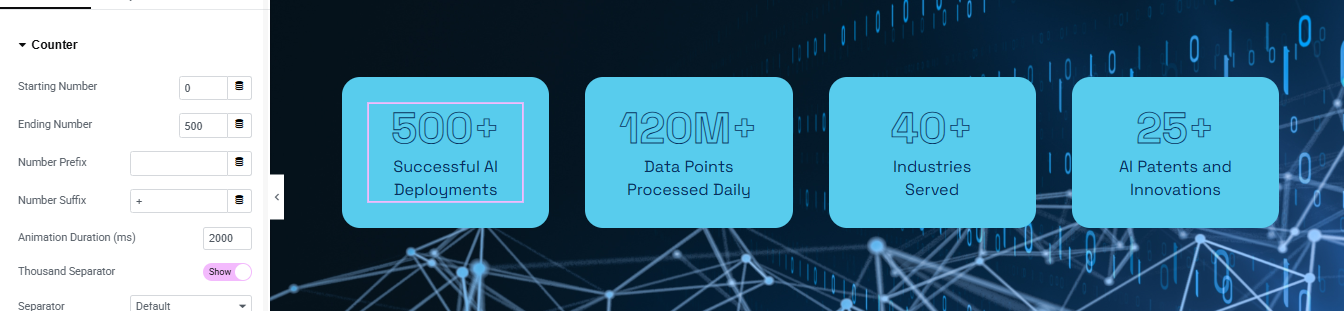
Set Background
- Select the section → go to Style > Background.
- Choose a dark background image or solid dark blue/gradient.
Step 3: Add Counter Widgets
- In each column, drag in a Counter widget (Elementor’s built-in).
- Starting Number: 0
- Ending Number: 500 (or the correct number)
- Prefix: (leave blank)
- Suffix: + or M+ depending on stat
- Title (Below the number):
Style Each Counter Box
- Background Color: Light Blue (#63d3ff or similar)
- Text Color: Dark Blue/Navy
- Padding: 20–30px
- Border Radius: 20px for rounded corners
- Box Shadow: Add a subtle shadow if desired
- Font Size: Large (e.g., 40–60px)
- Weight: Bold or Semi-bold
- Title text:
- Size: Medium (~16–20px)
- Color: Match brand palette
Team Section
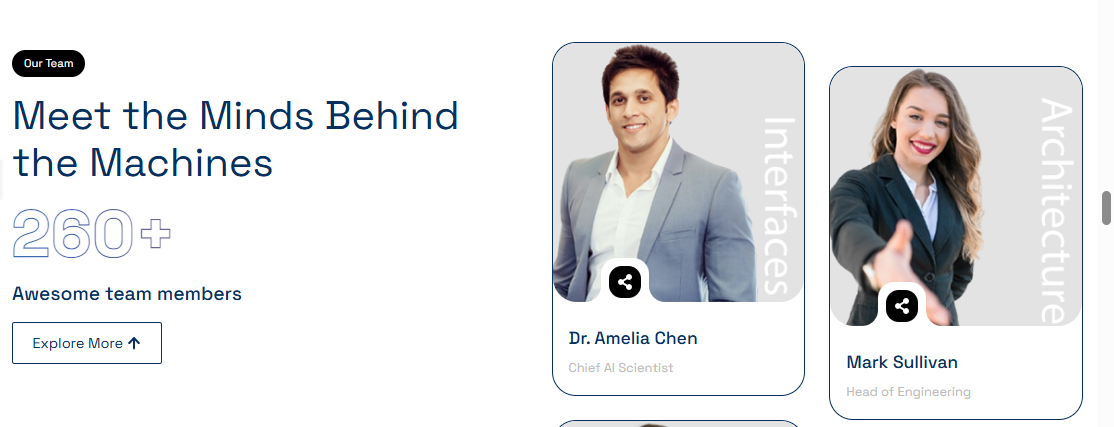
Add Heading & Label (Left Column)
Inside Left Column:
- Use a Text Editor or Button widget.
- Text:
- Style:
- Background: Black #000
- Text Color: White #fff
- Padding: 8px 20px
- Border Radius: 20px
- Font Size: 12–14px, Bold
- Main Heading:
- Text:
- Font: Bold, Modern (e.g., Poppins, Montserrat)
- Font Size: 40–48px (desktop), responsive sizes on tablet/mobile
- Color: Dark Navy (#0A2C52 or similar)
- Team Count:
- Add a Heading widget or Text Editor:
- Text: 260+
- Style:
- Font Size: 60–80px
- Weight: Extra Bold
- Color: Transparent with blue outline (via text stroke if using custom CSS)
- Subtext:
- Text:
- Font: 16-18px, medium weight
- Explore Button:
- Text: Explore More ↑
- Border: 1px solid navy
- Text Color: Navy
- Background: Transparent
- Padding: 10px 25px
- Border Radius: 6px
Add Team Member Cards (Right Column)
- Image Box Widget
- OR Create manually with Image + Name + Title + Overlay Icon + Label
For each Team Member:
- Image: Upload photo
- Add border radius: 12–16px
- Overlay Label (Vertical Text):
- Name (Heading):
- Text: e.g., Dr. Amelia Chen
- Font: Bold, Size: 18–20px, Color: Dark Blue
- Position (Text):
- Text: e.g., Chief AI Scientist
- Color: Light Gray, Font Size: 14–16px
- Overlay Icon:
- Use Icon widget or a button (e.g., eye or share icon)
- Style:
- Shape: Circle
- Background: White
- Icon Color: Black
- Size: 36–40px
- Position: Absolute, bottom left (using Advanced > Positioning)
Repeat for Multiple Cards
- Use a Grid layout or repeater (custom loop) to duplicate multiple cards
- Ensure consistent spacing and alignment
- Optional: Add hover effects (zoom image, show more info, etc.)
Contact Section
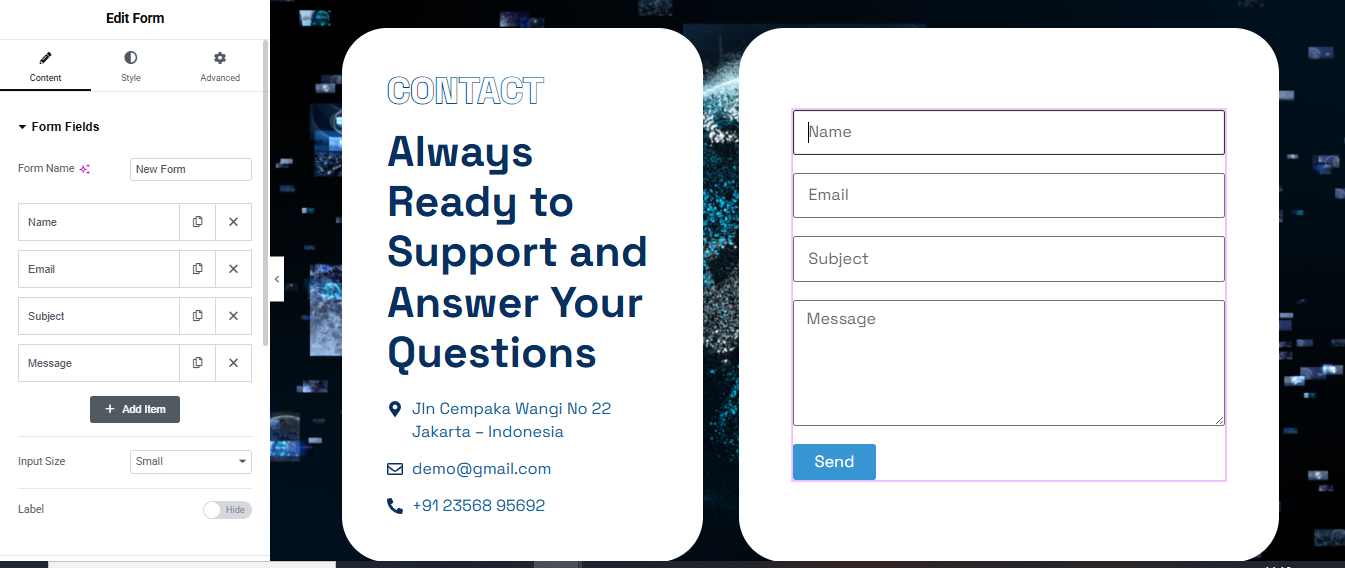
Section Structure
Left Side:
- Contact Heading
- Brief message or CTA
- Contact info (phone, email, address)
Right Side:
- Contact form (Name, Email, Message, Submit)
Left Column – Contact Info
- A. Heading
- B. Subheading / Text
- C. Contact Details
- Address
- Phone
- Style:
- Icons: Left aligned
- Spacing: 10–15px between items
- Font Size: 16–18px
Right Column – Contact Form
- Form Fields:
- Name (Text)
- Email (Email)
- Message (Textarea)
- Submit Button
- Styling:
- Field Width: 100%
- Padding: 12px
- Border Radius: 8–12px
- Text: White
FAQ Section
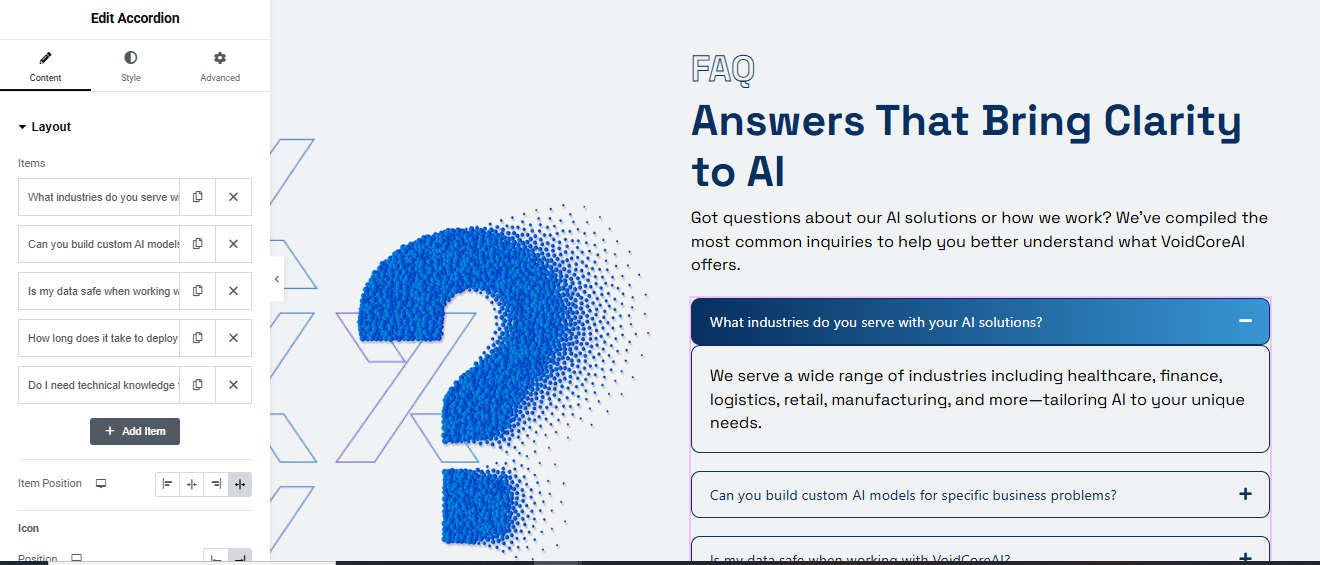
Insert the Accordion Widget
- In the right column, drag in the Accordion widget.
- In the Content tab, enter each FAQ item:
- Title: The question
- Description: The answer
- Add more items using the “Add Item” button.
Style the Accordion
- Click the Style tab:
- Border: Add light border (1px) if not present.
- Box Shadow: Optional subtle shadow.
- Typography: Use same fonts/colors as the rest of your site.
- Icon Position: Right or left (choose your preferred layout).
- Active Background: Set it to a dark gradient or primary brand color.
- Inactive Background: Light or white.
Add Visual Elements (Optional)
- In the left column, add:
- An Image widget for the 3D question mark.
- Or a Lottie animation if supported.
- Adjust image spacing with padding/margin.
Blog Section
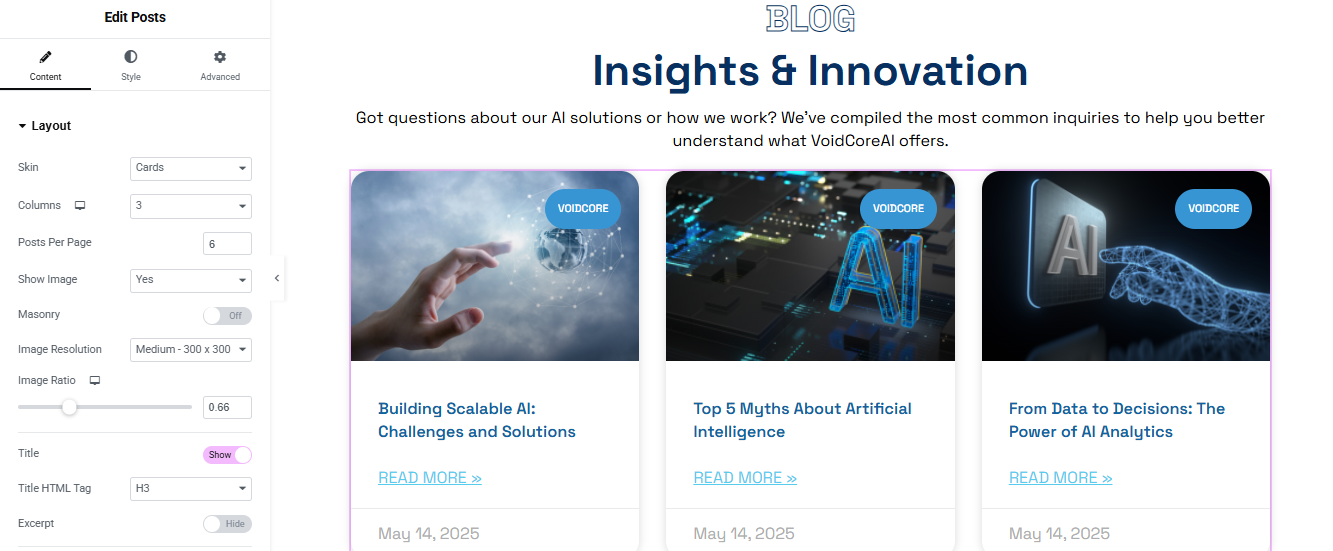
Insert the Posts Widget
- Drag the “Posts” widget (Elementor Pro) into the section.
- In the Content > Layout tab:
- Skin: Cards
- Columns: 3 (adjust for tablet/mobile)
- Posts Per Page: 6
- Show Image: Yes
- Masonry: Off
- Image Resolution: Medium – 300×300
- Image Ratio: ~0.66 (if you wish)
- Title: Show
- Title Tag: H3
- Excerpt: Hidden
- Read More: Show
- Date: Show (in lighter tone)
Style the Posts Widget
- Switch to the Style tab and adjust the following:
- Card Styling
- Background: White
- Border Radius: ~16px
- Box Shadow: Subtle (to lift the cards)
- Spacing: 20–30px between items
Image Styling
- Border Radius: Match card radius (top only)
- Image height: ~200–250px (controlled via ratio)
Typography
- Title: Bold, dark blue (#012D5A or brand color)
- Date: Light gray
- Hover Effects
Slight zoom-in on image - Slight shadow increase on card hover